Episode Tiles
Add single episodes to a group as their own tiles that open straight to that episode in Stremio, and choose how they look.
On this page
An episode tile is one episode of a show, saved in a group as its own poster. This guide covers the ways to add tiles, what they show on the group page, how they look in Stremio, and the few places they can't go.
Adding tiles needs the Owner or Contributor role in the group. Watchers see tiles like any other title, but get no episode picker and no style controls (see Groups, Roles & Invites).
What is an episode tile?#
A group usually holds movies and whole series. A tile sits next to them as a single episode, for example Bob's Burgers S11 E4, and it can even sit next to the same show's own series row. In Stremio, clicking the tile skips the show page and goes straight to that episode's streams.
Tiles suit themed groups: a Halloween row of every show's Halloween episode, a "best of" list of standout episodes, or the one episode you want a friend to see.
Add episodes#
From Add Content#
- Open Add Content and search for a show.
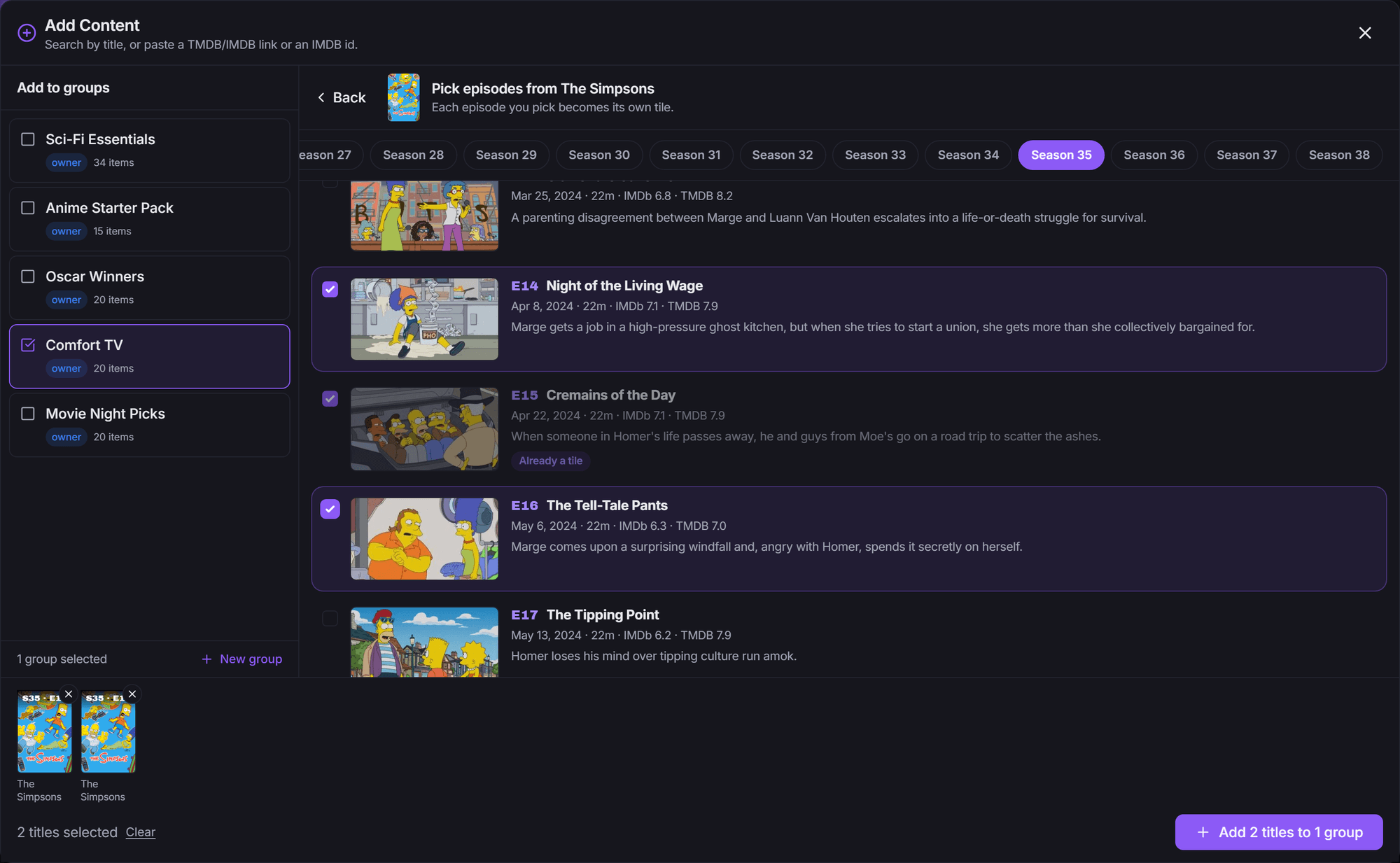
- Every series result has an Episodes chip under its poster. Click it to open that show's episodes inside the window.
- Choose a season from the tabs (Specials comes first when the show has any) and tick the episodes you want. Each row shows the episode number, title, air date, runtime and its IMDb and TMDB ratings.
- Click Back to return to your results and keep searching, or add straight away.
Picked episodes join the tray at the bottom, labelled S11 · E4 (or Special) over the show's poster. They're added as tiles to every group you tick, with the same Add N titles to M groups button as everything else.
A row that reads Already a tile is in the group already (the first group you ticked), and a Not aired yet episode can't be picked until it airs.
From a show in the group#
On the group's Items tab, click a series to open its details and click Pick episodes. A window like Pick episodes from Bob's Burgers opens and works the same way: check the group under Adding to, tick episodes and click Add 1 episode (or Add N episodes).
The show stays in the group next to its new tiles, unless you tick Also remove the whole show ("Only the picked episodes stay in Movie Night."). That option appears only for the owner or whoever added the show, and only when you're adding to the same group. The show is removed only if at least one episode was added.
Already looking at a tile? Click Add more episodes in its details to pick more of the same show.
Paste an episode link or ID#
In the Add Content search box, paste an episode id such as tt1561755:11:4 (the show's IMDb id, then the season, then the episode), or a Stremio link to an episode, such as stremio:///detail/series/tt1561755/tt1561755:11:4 or one copied from Stremio Web. That one episode drops into your tray, ready to add as a tile.
Adding an episode that's already a tile in a group never makes a second one: Add Content reports it as "already there".
Add an episode from Stremio#
When you use ✨ Add to Group List on an episode in Stremio (see Adding Movies & Series), what happens depends on what the group already holds.
The show isn't in the group yet#
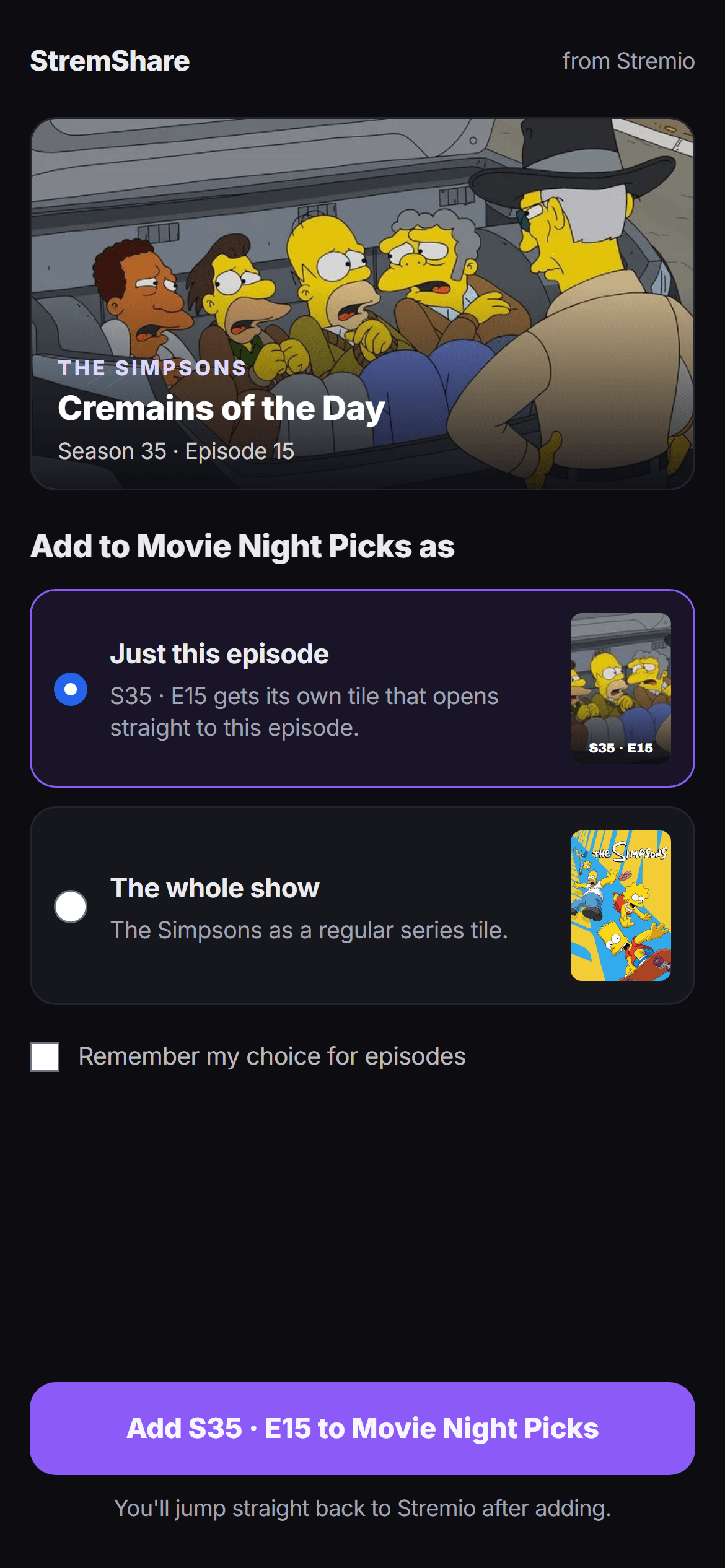
With the default Confirmation page setting, a page opens titled with your group's name, like Add to Movie Night as, with two choices:
- Just this episode: "S11 · E4 gets its own tile that opens straight to this episode."
- The whole show: the show as a regular series tile.
Pick one and tap the button, for example Add S11 · E4 to Movie Night. You jump straight back to Stremio after adding (not on a TV: see below).
If the page can't load the episode, it says Couldn't load this episode and offers Add the whole show instead, or only Back to Stremio when the add couldn't work either.
The show is already in the group#
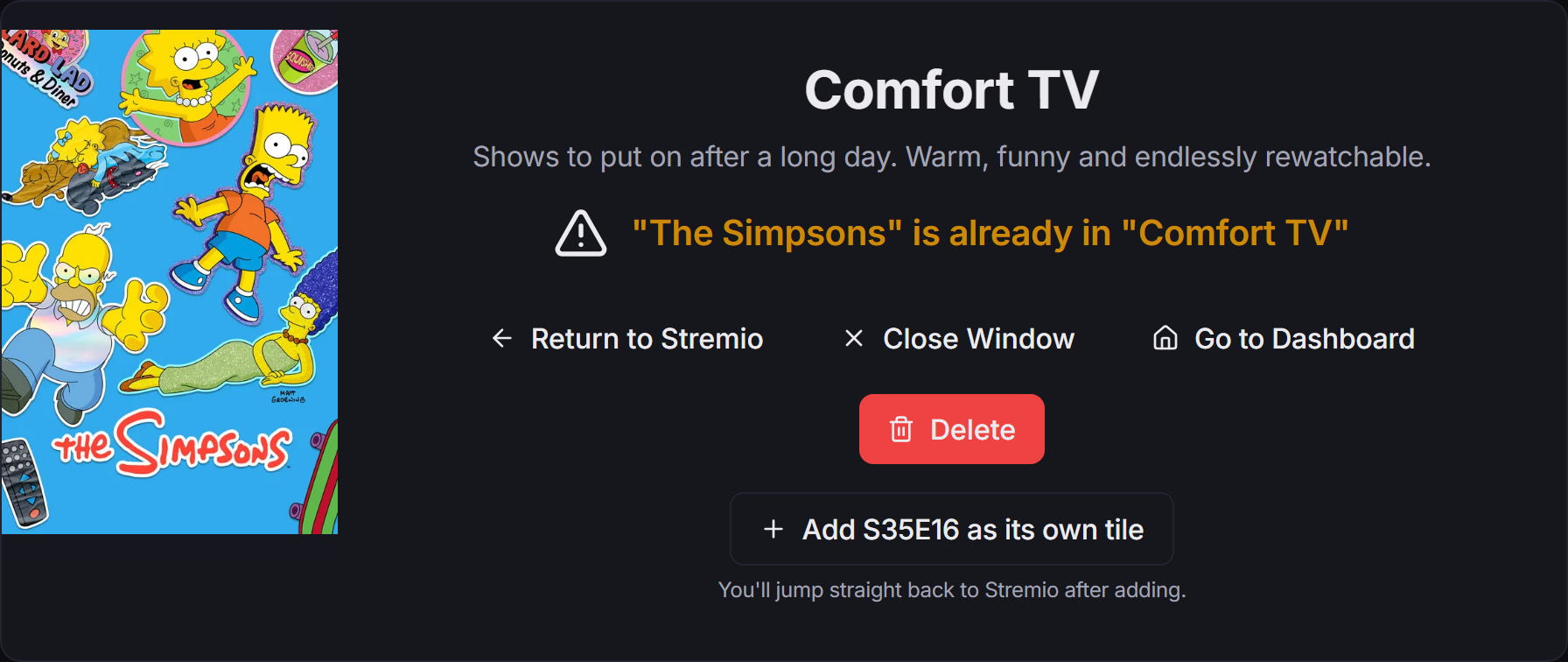
That group's entry reads ✅ Already in group, as it does for any title that's there, and it never adds anything by itself. Select it and the page that opens offers Add S11E4 as its own tile (Add this special as its own tile for a special). Tap it to add the tile next to the show, and you jump back to Stremio.
The episode is already a tile#
The group's entry says so, for example ✅ Movie Night: S11E4 "Heartbreak Hotel-Oween" is already a tile, along with the tile's group rating and recent reviews.
Remember your answer#
Tick Remember my choice for episodes on the choice page and later episode adds skip it. You can change or undo that in Add-on Setup → Preferences → When you add an episode from Stremio: Ask each time, Just the episode or The whole show. It's one setting for your whole account, so the checkbox isn't offered when the add-on was installed from a profile's own link. See Add-on Setup.
Even with Just the episode remembered, a show that's already in the group still waits for you to tap Add S11E4 as its own tile.
The whole show is always added in two cases: with Short video in Stremio chosen under After you add something from Stremio (there's no page to ask on), and in groups that can't hold tiles (see Rules and limits).
On a TV#
A TV browser can't open Stremio from a web page, so nothing jumps back after you add. The page says "Press Back to return to Stremio." instead.
TV browsers too old for the full page get a plain version of the choice: two buttons, Just S11 · E4 (Just this special for a special) and The whole show, with Remember my choice for episodes above them when it's offered. There's no preview, so an episode the group can't take as a tile only says so after you pick it. On a show that's already in the group, the plain page just tells you so, with no Add S11E4 as its own tile button: add the tile from the show in the group instead.
Tiles in your group#
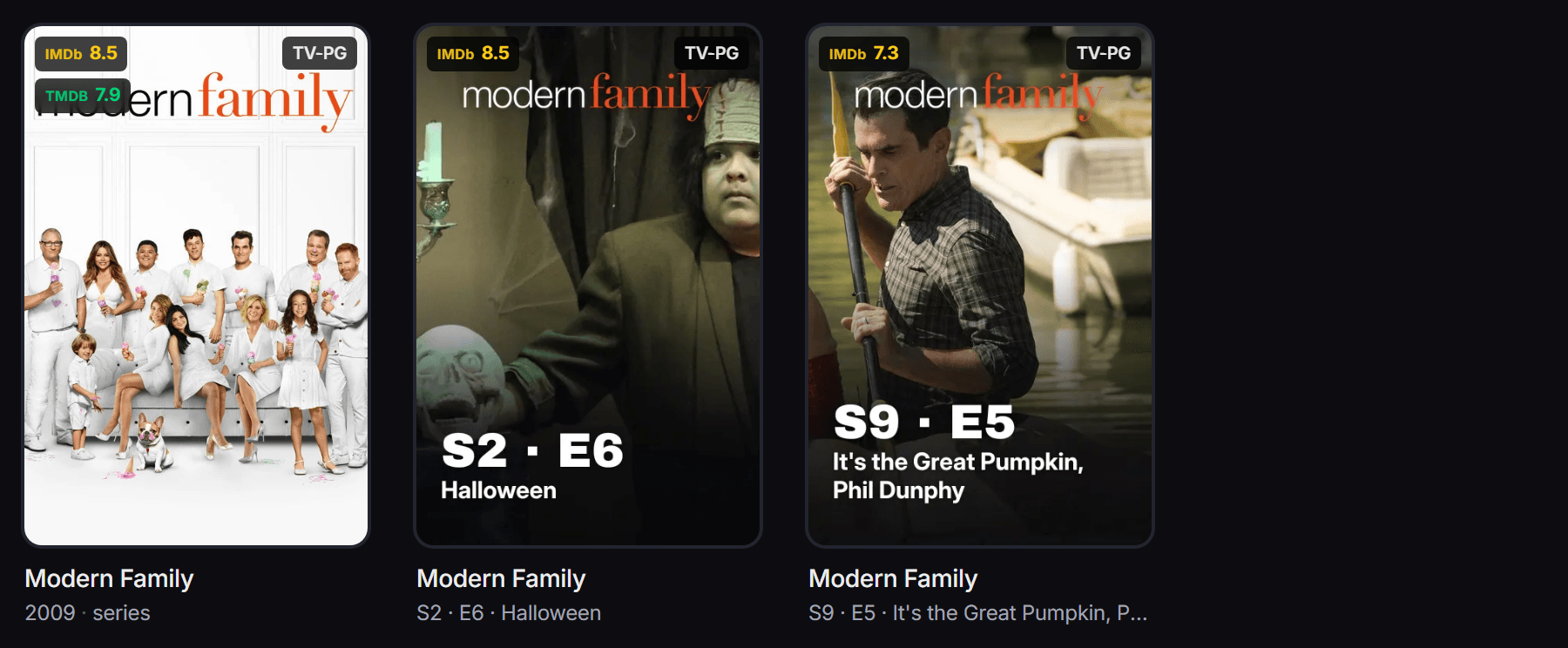
On the Items tab a tile shows its own poster, the same picture Stremio gets. Under it are the show's name and a line like S11 · E4 · Heartbreak Hotel-Oween (a special reads Special and its title). On the poster, the episode's own IMDb rating and the Group rating (once someone has rated the tile) sit side by side at the top left, and the show's age rating (such as TV-14) at the top right. In list view the row shows the episode's IMDb and TMDB ratings.
A brand-new tile shows a stand-in drawn in its style until its poster is ready, usually within a minute or two.
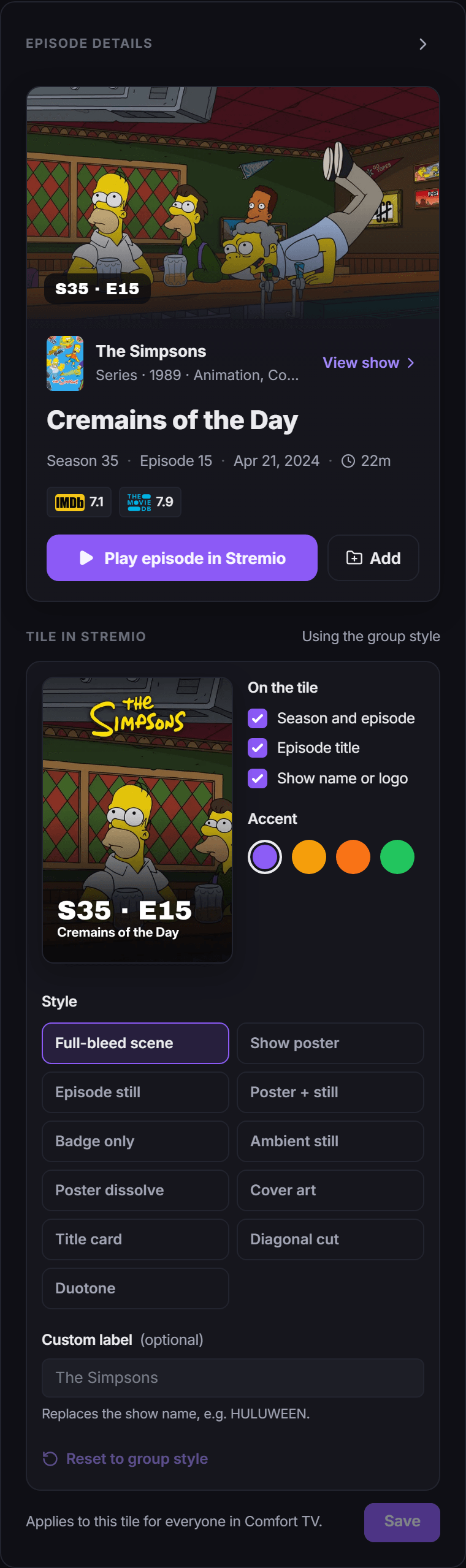
Click a tile to open Episode details:
- Play episode in Stremio opens that exact episode.
- Add puts the same episode into another of your groups as a tile (the window is called Add episode to a group).
- View show opens the show's own row, when the show is in the group too.
- The episode's synopsis, director, writer, guest stars and air date.
- Tile in Stremio changes how the tile looks, for the owner or the contributor who added it (see below).
- More from Bob's Burgers in Movie Night lists the group's other tiles of that show, with Add more episodes for Owners and Contributors.
A few more things work as you'd expect:
- Ratings and reviews. A tile has its own ratings and reviews, separate from the show's, and every member can add them. See Ratings & Reviews.
- Activity. Adding a tile shows on the group's Activity tab, and clicking that entry opens the tile.
- Group previews. On My Groups, Discover and your Dashboard, a group's posters show each tile's own picture, so five tiles of one show don't look like five copies of it.
- Hide watched. With Hide watched on (in the group's Filters, or in your add-on), a tile hides once you've watched that episode. The show's other tiles stay. See Watch Tracking.
- Removing. Remove a tile in edit mode like any title: owners can remove any tile, contributors the ones they added.
How a tile looks in Stremio#
In Stremio a tile is named <Show>: <Episode title>, for example "Bob's Burgers: Heartbreak Hotel-Oween". Its description starts with the episode code and air date, then the episode's synopsis, and its IMDb rating is the episode's. Clicking it opens that episode's streams.
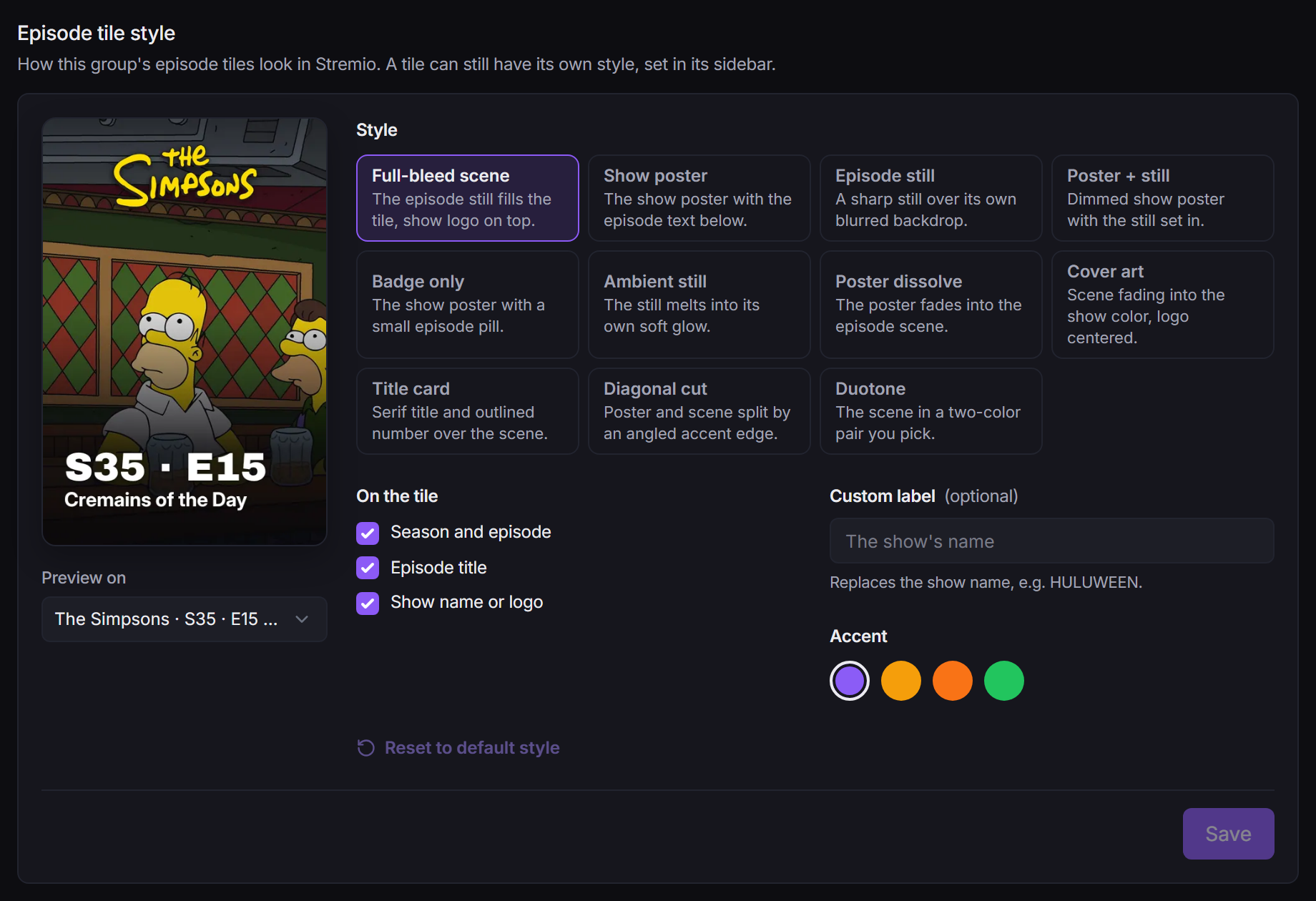
StremShare draws the tile's poster in one of 11 styles:
| Style | What it looks like |
|---|---|
| Full-bleed scene (default) | The episode still fills the tile, show logo on top. |
| Show poster | The show poster with the episode text below. |
| Episode still | A sharp still over its own blurred backdrop. |
| Poster + still | Dimmed show poster with the still set in. |
| Badge only | The show poster with a small episode pill. |
| Ambient still | The still melts into its own soft glow. |
| Poster dissolve | The poster fades into the episode scene. |
| Cover art | Scene fading into the show color, logo centered. |
| Title card | Serif title and outlined number over the scene. |
| Diagonal cut | Poster and scene split by an angled accent edge. |
| Duotone | The scene in a two-color pair you pick. |
Alongside the style you choose what goes On the tile (Season and episode, Episode title, Show name or logo), an optional Custom label of up to 24 characters that replaces the show name (for example HULUWEEN), an Accent (Violet, Amber, Orange or Green) and, for Duotone, the Duotone colors (Violet and pumpkin, Midnight and orange or Crimson and lime).
A tile's poster always wins over a poster provider such as RPDB, and Up Next episode badges never touch tiles.
The group's default style#
The owner sets it in the group's Settings → Episode tile style. The preview shows one of the group's tiles (pick which under Preview on), and Reset to default style goes back to Full-bleed scene. Save redraws the group's tiles ("Saved. Your 4 episode tiles are being redrawn."). A tile with its own style keeps the changes made to it and follows the group for the rest.
One tile's style#
Open the tile and use Tile in Stremio. It says Using the group style or Custom for this tile. Change anything, check the preview and click Save. The change applies to that tile for everyone in the group. Discard drops unsaved changes, and Reset to group style makes the tile follow the group again. Only the group owner, and the contributor who added that tile, see this section.
A redrawn poster can take a couple of minutes to reach Stremio, and Stremio may keep showing the old one until you restart it.
Rules and limits#
- Some groups can't hold tiles. Your Up Next group, and any group with a Trakt Up Next or new-episodes list, follow the next episode for you, so a fixed episode doesn't fit there. Adding one says "Episodes cannot be added to an Up Next or new-episodes group."
- Send to Group leaves tiles out. Copying titles in edit mode skips tiles: "Tiles can't be sent to another group yet; open a tile and use Add instead."
- Smart lists leave tiles alone. A sync never moves, replaces or removes a tile, and a tile doesn't count as the show being in the group, so a list can still add the series next to it. Removing a tile by hand doesn't stop a list adding the show. See Smart Lists.
- Removing the show keeps its tiles. Deleting a show's series row leaves its episode tiles in the group.
- Specials are season 0. They're on the Specials tab, read
Specialon the tile, and use season0in a pasted id (tt0182576:0:60). - One tile per episode. Adding the same episode to the same group again says it's already there.
- Made for Stremio. In Nuvio, a tile may open the show rather than the episode.
Good to know#
- No Episodes chip on a result? Only series have one, and only when StremShare knows the show's IMDb id.
- "That id belongs to a movie, so it has no episodes." The id you pasted is a movie's. Paste an episode id (
show:season:episode) instead. - "We couldn't find that episode's show." StremShare couldn't look up the show from the
tt…part of the id. Check it, or search for the show and use its Episodes chip instead. - No Pick episodes or Add more episodes? Those are for Owners and Contributors.
- No Tile in Stremio section? Only the owner, or the contributor who added the tile, can restyle it.
- Old poster still in Stremio? Redraws take a couple of minutes, and Stremio may need a restart to load new posters.