AI Search & AI Curator
Describe what you feel like watching and let AI find it, or let the AI Curator arrange your Stremio homepage for you.
On this page
StremShare has two AI features. AI search understands requests like "90s heist movies" or "korean thrillers on Netflix", on the web and inside Stremio. The AI Curator builds and refreshes your Stremio homepage rows around what you watch.
Beta
Both features are in beta. If a control is greyed out with an In beta pill, your account isn't in the beta yet: the feature is being tested with a small group before it opens to everyone.
AI search on the web#
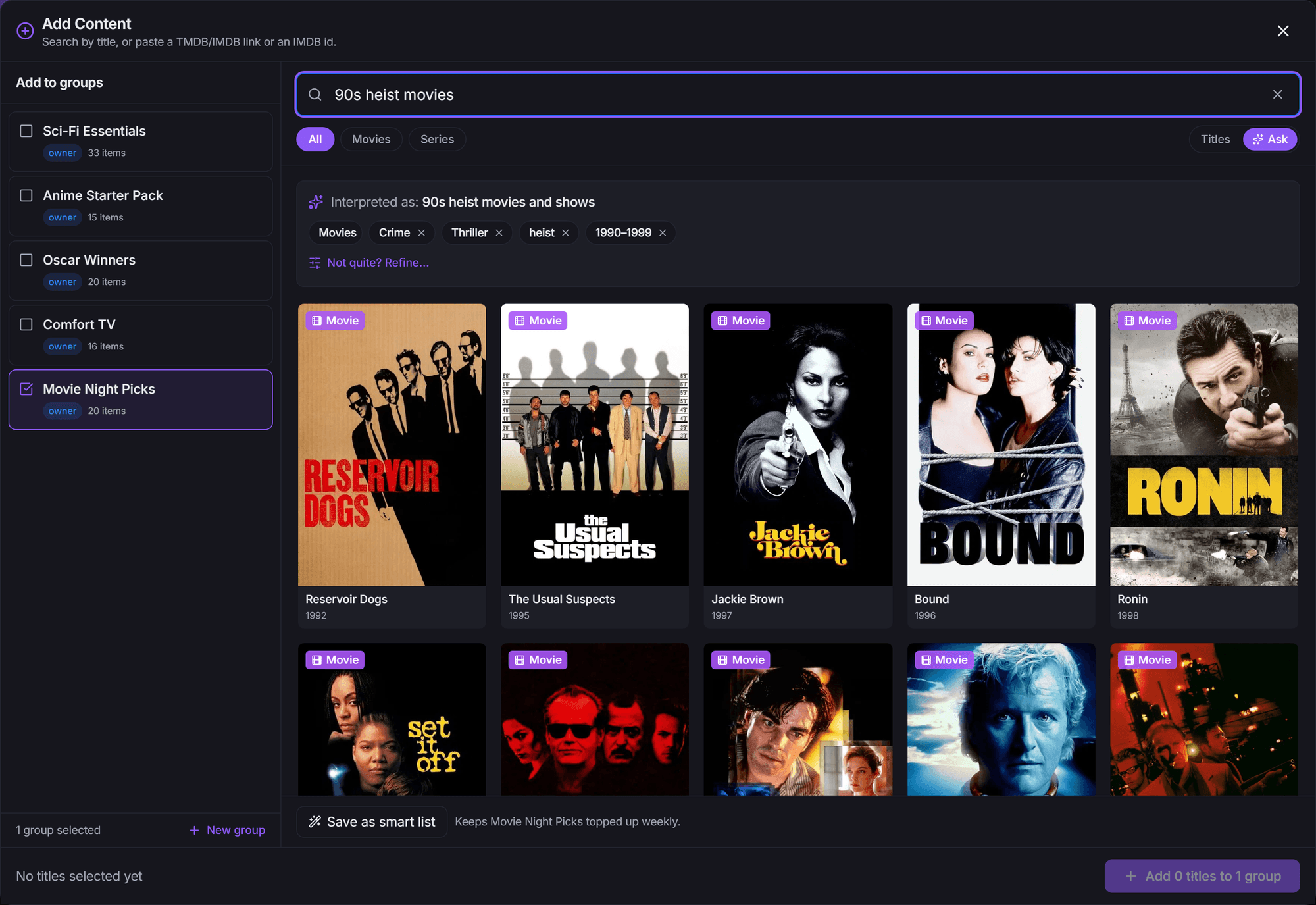
AI search lives in the Add Content window (open a group and click Add Content).
- Switch the search box from Titles to Ask.
- Describe what you want, for example "slow-burn sci-fi like Arrival" or "underrated horror from the 2010s". Type at least 3 characters and press Enter.
- Results appear as a grid. Pick the titles you want and add them to your groups as usual.
Reading and adjusting the results#
Above the results, Interpreted as: shows how the AI read your request, as a row of chips (a genre, an actor, a decade, a streaming service and so on).
- Remove a chip with its × to drop that part of the request. The results update without a new AI search.
- If something couldn't be used, a short note says why (for example that a filter only applies to movies).
- Not quite? Refine… opens the List Builder with the AI's filters already filled in, so you can fine-tune them by hand. It needs a group selected, because the List Builder builds into a group. See Smart Lists.
Saving a search as a smart list#
Below the results, Save as smart list turns the search into a smart list in the groups you've selected. It's topped up weekly, so new matches keep arriving on their own.
"Like …" searches (such as "movies like Arrival") work a little differently. They can't be opened in the List Builder, so Refine is off for them. Most can still be saved as a smart list; when one can't, the bar says so and you can add the titles by hand instead.
When AI search is busy#
If the AI service is slow or unavailable, you'll see "AI search is busy, showing title matches" and the window falls back to a normal title search. Plain title searches always work, AI or not.
Limits#
AI searches are limited to 10 a minute and 60 a day per account (the day resets at midnight UTC). Searches from the Stremio row below count toward the same daily limit. When you reach it, Ask is back the next day and Titles keeps working.
Supporter
Supporter accounts get up to 300 AI searches a day. Supporter is StremShare's upcoming paid plan and isn't available to buy yet. See Account → Plan for what it includes.
AI search in Stremio#
You can also have AI search inside Stremio's own search box.
- Open Add-on Setup and go to the Preferences tab.
- In the Search in Stremio card, switch on AI search row.
- Reinstall the add-on (or link your Stremio account so it's updated for you). See Add-on Setup.
Now when you search in Stremio, a row called StremShare Discover answers requests like "korean thrillers on Netflix" from the whole catalog, not just your groups. It shows up to 20 results. Plain title searches are left to Stremio's own search, so typing a movie's name won't fill this row.
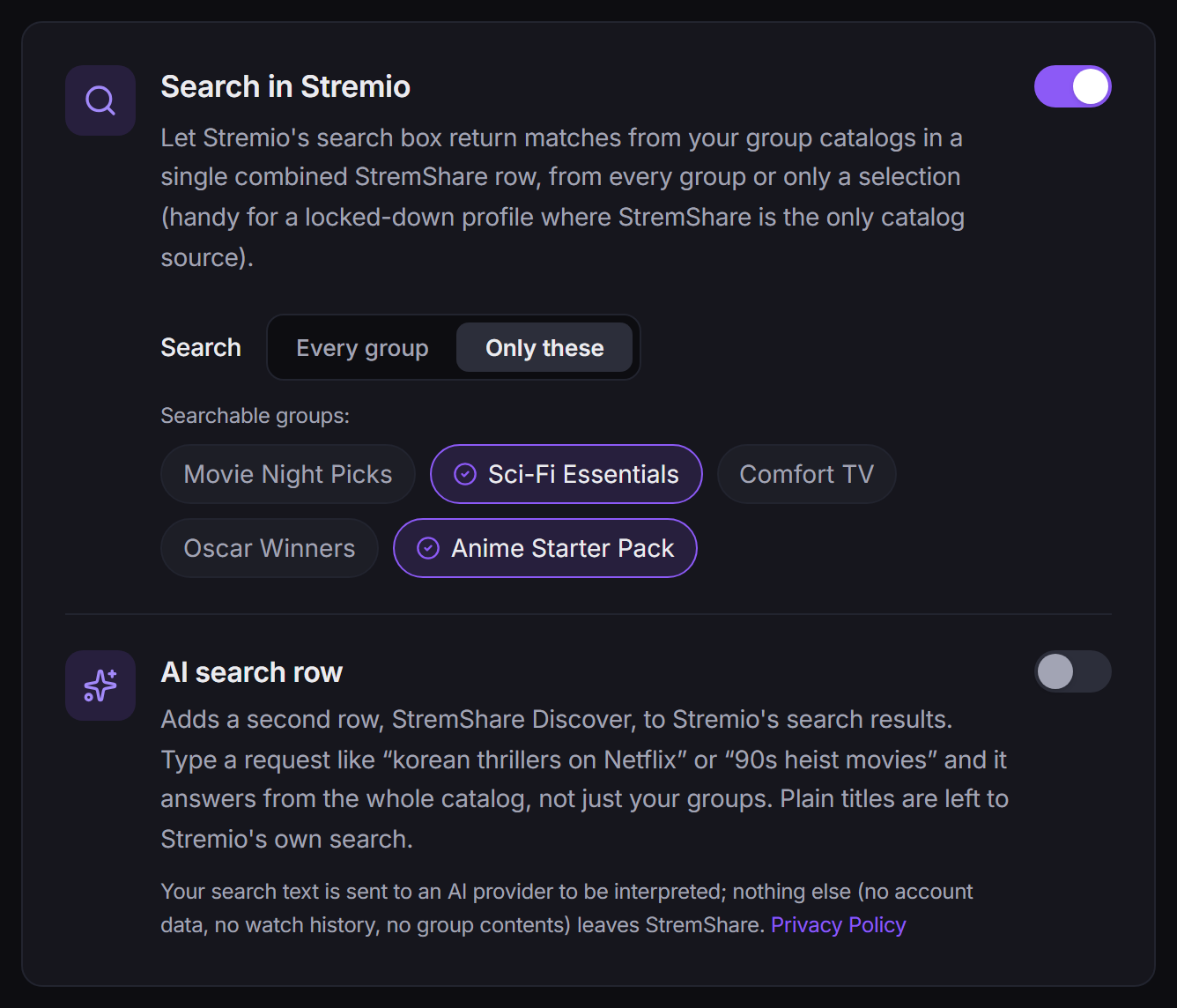
The AI search row works with or without the regular group search row above it. On a profile's own add-on, results respect that profile's content rating limit.
Privacy: only your search text is sent to an AI provider to be interpreted. No account data, watch history or group contents leave StremShare.
AI Curator#
The AI Curator arranges your Stremio homepage for you. It picks which of your groups to show and in what order, can create new rows of its own (smart lists), and names them, based on what you've been watching, the time of year, and anything you tell it. It then re-plans on a schedule, so your homepage stays fresh without any setup.
Turning it on#
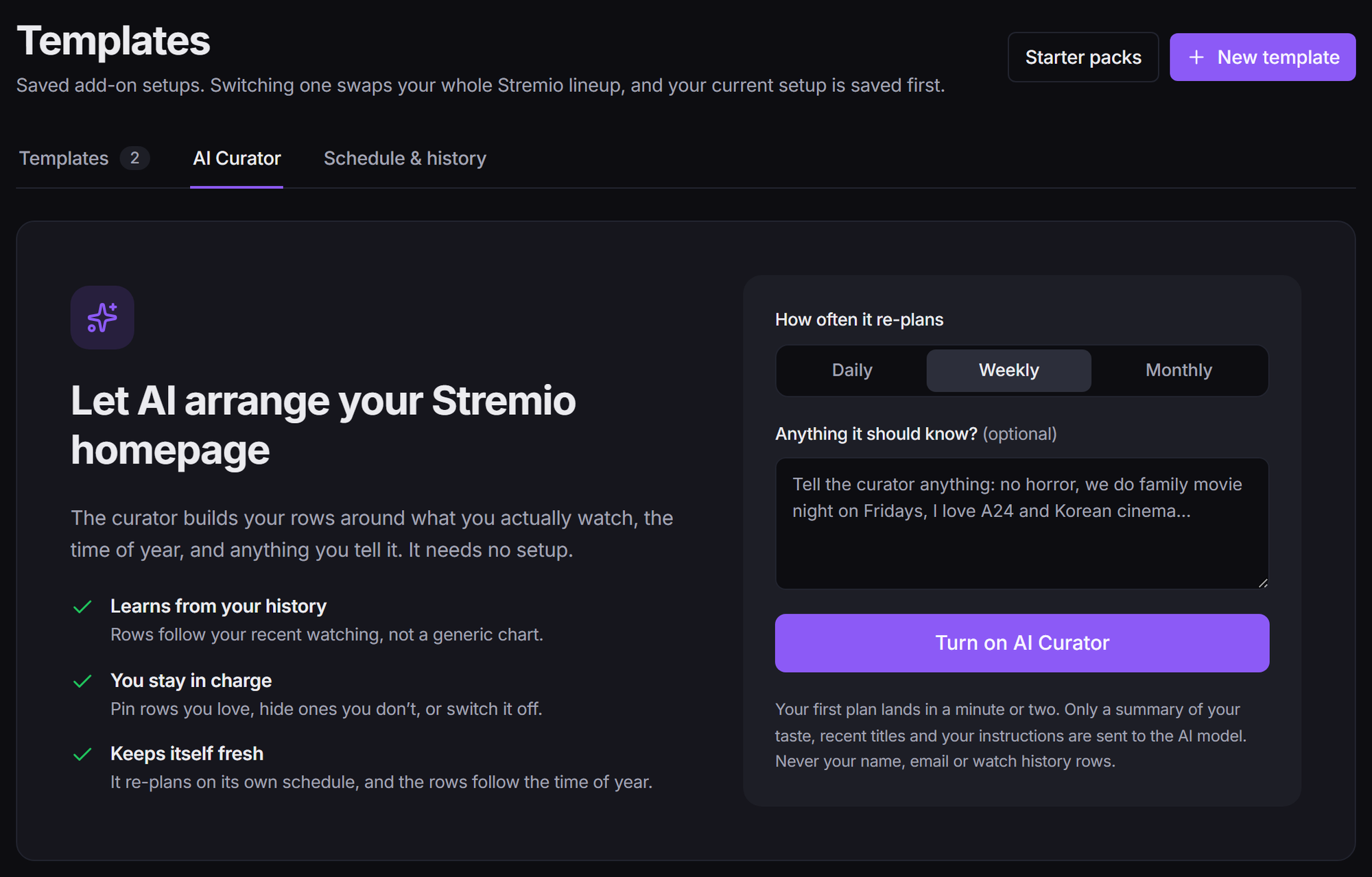
- Open Templates and click the AI Curator tab.
- Optionally pick How often it re-plans and write anything it should know under Anything it should know?.
- Click Turn on AI Curator. Your first plan lands in a minute or two.
You can also switch it on during onboarding with Let AI curate my homepage.
The curator keeps its own template, which becomes your live template. See Templates. If your Stremio account isn't linked, reinstall the add-on to see the first plan; with a linked account it's pushed for you.
What you can control#
- How often it re-plans: Daily, Weekly (the default) or Monthly.
- Instructions (up to 500 characters): anything in your own words, like "no horror, we do family movie night on Fridays, I love A24". The curator reads it word for word on every plan. Click Save after editing.
- Keep my Up Next and Recommendations rows: keeps your personalized rows on every plan (Up Next stays first); the curator only chooses where the recommendation rows go.
- Always keep: click Choose groups to pick groups that are kept on every plan, and choose where each goes: Top, Bottom or Let the AI place it. The card counts how many you've kept against your limit.
- Refresh now: re-plans right away. The status bar says how many manual refreshes you have left.
- Plan history: every plan the curator made, and what happened to it.
Now showing#
Now showing lists the rows on your homepage right now. Rows the curator made are marked differently from your own groups, and tags show Pinned and Always included rows. Each row has actions:
- Pin (or Unpin): keep this row across future plans.
- Never show it again: remove it now and never propose anything like it again. If the curator had joined you to that group, you also leave it.
- Remove now: take it off your homepage now. The curator may propose it again on a later plan.
On a phone these actions sit behind the ··· button on each row.
How it changes your homepage#
On each refresh the curator replaces which rows show, their order and their names. It keeps each row's own settings (Stream, Random order, Movies/Series and Hide watched) for as long as the row stays. So if you switch off or drag a curated row on Add-on Setup, that only lasts until the next refresh. To keep a row, pin it or add it to Always keep.
The curator avoids flip-flopping: a daily curator changes a few rows at a time, a weekly one about half the screen, and rows it just retired don't bounce straight back.
Scheduled templates come first. If an auto-switch rule has another template live, the curator's rows wait until no rule is active. Pausing auto-switching (on Templates → Schedule & history) also holds the curator.
Refresh limits#
On a free account you get 2 manual refreshes a week. The automatic plans on your chosen schedule don't count toward this.
Turning it off#
Switch it off at the top of the AI Curator tab. It stops re-planning, and your current rows stay until you remove them.
Privacy#
Only a summary of your taste, recent titles and your instructions are sent to the AI model. Never your name, email or watch history rows.
Supporter
Some curator options are part of Supporter, StremShare's upcoming paid plan. Supporter isn't available to buy yet. These options are marked with a Supporter pill; see Account → Plan for the full list.
- Daily re-planning (Weekly and Monthly are free).
- More rows: up to 16 rows on your homepage instead of 12.
- Different rows for mornings and evenings: family-friendly, lighter rows in the morning and the rest in the evening, switching automatically at 5am and 5pm.
- A curator for each profile: the Curating for tabs let each Stremio profile have its own curator, planned from that profile's own watching and within its content rating limit.
- What's on this week: plans that take into account what's premiering and trending this week.
- More manual refreshes: 3 a day for each homepage you curate (up to 10 a day in total), instead of 2 a week.
Related guides#
- Add Content: the Add Content window, including Titles search.
- Smart Lists: the List Builder that Refine… opens.
- Add-on Setup: where the AI search row lives.
- Templates: how the curator's template fits alongside yours.
- Watch Tracking: the watch history the curator learns from.